
New CDW Research: How Organizations Optimize the Digital Experience
The modern workplace requires organizations to deliver an excellent user experience while overcoming challenges related to security and integration.
Work has evolved radically in recent years as organizations dealt with factors such as the fallout from a global pandemic and the emergence of generative artificial intelligence. New research from CDW makes clear that organizations must address the gaps that exist in their technological and cultural environments to deliver a modern workplace that meets the needs of both employees and customers.
In surveying 953 IT decision-makers (ITDMs) across many industries, CDW found that 49% of respondents said their organization’s long-term work model is to maintain hybrid flexibility. Further, 65% stated that remote and hybrid work “boost productivity and talent retention.”
However, to deliver these benefits, organizations must overcome significant hurdles. The survey revealed that, by a small margin, respondents’ top challenge in the workplace environment, at slightly more than 50%, is employee resistance to new platforms.
“That resistance to new tools is just a thing that's going to be there, no matter what. It’s a human thing,” says Karlynn Snyder Turner, a contact center engineering manager with CDW. “But technology is constantly changing, and you have to adapt. That means adapting your mindset as well as the technology platforms that you're utilizing. This research validates what we are hearing from our customers every day.”
Building Better Modern Workplace Solutions
To move beyond this resistance, leaders must identify the outcomes they’re trying to achieve with new platforms and create a roadmap that leads the organization there, says Vanessa Ambrose, a senior solution architect for digital experience with CDW. “It’s nuanced from organization to organization, but the best way to start that process is usually with an assessment,” she says. “When you start the migration process, you want to say, ‘At the end of this project, here is what we want the experience to look and feel like.’ And then it's a lot easier to build in milestones throughout, even if it is a very long process.”
CDW’s research on workplace modernization identified a number of important trends in workplace technology and offered insights into how organizations are implementing a variety of new tools.
Looking to modernize your workplace? CDW can help.
Overcoming Challenges in the Future of Work
Roughly 50% of the ITDMs surveyed by CDW cited security concerns as a workplace challenge, while 47% said they were challenged by a lack of integration among tools.
These difficulties reflect some of the lingering effects of the global pandemic. The massive shift toward remote work created an environment that greatly increased the attack surface organizations must defend against cyberthreats. Further, the influx of new tools created integration challenges as IT teams worked to deploy them effectively.

“When COVID started, and organizations had to make the decision to send all of their people home, they bought the tools they needed in the moment that they could get access to,” says Sheena Vojta, director of digital experience at CDW. “But it's really difficult to be intentional about your investment decisions if those decisions are being made in individualized silos rather than as part of an organization's overall IT roadmap.”
Satisfaction With Workplace Tools
While the echoes of the pandemic continue at some organizations, many respondents indicated that they are happy with the quality of the technology tools they have to help users work together. In fact, 88% said they were satisfied or very satisfied with the overall user experience of their meeting platform. The same percentage indicated that they were satisfied or very satisfied with the video and audio quality.
These results suggest that organizations have achieved some level of success in their strategic planning for workplace technologies in the post-pandemic era, Vojta says. This planning requires a clear roadmap leading to desired outcomes. The cloud has provided an effective path to solve the integration problems that many organizations face. “With everything going toward the cloud, we're seeing that it is a lot easier to start integrating these things,” Snyder Turner says.
AI Workplace Tools Are Revolutionizing the Employee Experience
The research revealed a broad sense of optimism among respondents about the impact that AI can have in the workplace. The top trend in end-user technology that respondents said they were most curious and excited about was AI-enhanced collaboration (for handling tasks such as meeting summaries, process automation and scheduling). Roughly 80% of respondents said they were excited about this trend.
“There's a lot of fear about AI displacing workers,” Snyder Turner says. “But I have less fear about it and more optimism that AI will take over tasks that lead to low job satisfaction and will deliver higher job satisfaction and enable folks to work on more complex things.”

How AI Improves Workplace Productivity and Automation
Respondents seemed to share a similar vision for AI. When we asked, “What’s one limitation with your current end-user technology environment that you hope AI can solve?” the most common responses cited automation and workflow efficiency. “AI could streamline fragmented workflows across platforms, reducing context-switching and improving focus, productivity and support for diverse user needs,” one respondent wrote.
Another stated: “One limitation with our current end-user technology environment is manual, repetitive tasks. I hope AI can automate these processes to improve efficiency and reduce human error.”

Achieving AI’s Potential Requires Preparation
Among organizations exploring AI tools, most hoped these tools would help boost employee productivity (68%) and improve security and compliance (68%). To achieve these objectives, many organizations are deploying tools that can be integrated easily within their digital workspaces.
“The first step in AI for many organizations has been to give individual coworkers tools that can help them do their jobs better, such as Microsoft Copilot, and help them be more efficient,” Vojta says.

Follow the Steps to AI Success
When preparing for new AI use cases, most respondents said their organizations have taken the following steps: introduced ethical-use policies for AI and data (58%), cleaned up or removed outdated or stale data (57%) and assessed data readiness or implemented access reviews (57%). These steps are best practices that organizations across industries should follow as they explore AI’s capabilities.
“That is 100% what we're recommending organizations do, and by and large that is what they are doing,” Vojta says. “It's really easy to get excited about the possibilities that AI brings to organizations, but it is so important to be intentional about how AI is being utilized.”
CDW can help you implement AI in your workplace.
The Ever-Present Specter of Security
As workplaces have become increasingly digital, incorporating more tools and technologies, security has become a top priority — and a major challenge. When we asked respondents about their biggest pain points with regard to securing remote or hybrid work, 70% cited managing diverse device and network environments.
“Security is always a concern, and it’s going to be a concern every day of our lives,” Snyder Turner says. “Hackers are always getting smarter. They’re always finding new ways to attack and to build on what somebody else did before them, and then they get to the next level. So, we're constantly having to add new defenses.”

A Critical Consideration
Security factors are paramount when IT leaders consider technologies to build their digital workspaces. When we asked, “How important are security and data privacy when choosing or switching digital workspace tools?” the vast majority of respondents (64%) said “extremely important,” while 30% said “important.”
“When we’re looking at a set of tools or a platform, particularly if we’re migrating from one tool to another, we have to look at the embedded security of that tool and how it aligns to the security investments that we might already have,” Vojta says. “This helps create the most secure solution that protects the organization and still offers a seamless employee experience.”
Applying Security in the Digital Workplace
Addressing cybersecurity challenges effectively requires the strategic application of policies and technologies. A significant majority of respondents (68%) believe AI has the power to help them improve security and compliance.
Mehboob Ahmad, a principal field solution architect for digital experience at CDW, says that AI can help analysts in a security operations center sift through terabytes of data from security logs to identify threats and vulnerabilities. “Being able to ask an AI tool a question in human terms — rather than having to know a structured query language — is a big win, where you can quickly enable your analysts to interact with those vast data lakes without having to rescale them,” Ahmad says. “Another example is the ability to find conflicts in a conditional access policy. It would take a lot of time for a human to pore through those policies to figure out where the conflicts may be, but an AI agent can do that analysis at machine speed and give you actionable findings quickly.”

Making Authentication Work
Authenticating users remains an essential capability for securing digital workspaces. In fact, 65% of respondents said their organization is using multifactor authentication to strike a balance between user experience and security. Further, 36% of the ITDMs we surveyed said they were implementing passwordless authentication or had fully implemented it, while another 36% were planning for the technology or testing it.
“It’s important to remember that passwordless is a journey; you’re not going to get there overnight,” Ahmad says. “We generally start with stronger authentication, such as device-based, and then layer biometric authentication, such as face recognition or thumbprints, on top of it. It will likely be a combination of such factors that will help you along your journey toward securing end-user identities.”
CDW can help your workforce remain secure and productive from anywhere.

The Continuing Evolution of the Contact Center
Our research indicated that organizations are adopting a multichannel approach in their contact centers, as more than 50% of respondents said they support voice, chat, text, email and social media.
As organizations continue to evolve their contact centers, Snyder Turner suggests they should make sure to keep their customers in mind. “Designing things for the ease of customers is where we need to go,” she says. “This research clearly reminds IT folks of the importance of what the customers want.”
Organizations are using AI to improve their contact center operations in a variety of ways. The most prominent use cases were chatbots and virtual agents (66%) and intelligent interactive voice response tools (60%).

Automating Contact Center Success
One significant benefit of such automated tools is that they can collect data that helps contact centers improve the experience of customers who call them. “As the contact center manager, I now have hard data on what people are calling in for and what they actually want to talk about,” Snyder Turner says. “And if there's an issue in there, I can see where it happens, and I can improve my system so that I'm having fewer customer issues.”
However, to use these tools effectively, data governance is critical. Sam Mashburn, technical lead for the Microsoft Productivity Practice at CDW, recommends that contact centers and other digital workspaces take advantage of tools such as Microsoft Purview to govern their data across on-premises, multicloud and Software as a Service environments.
“A lot of organizations aren’t ready for AI because they don’t have their data managed effectively,” Mashburn says. “Content sprawl is a real problem. How do we make that data into a manageable form so that AI can use it?”
Tom Dietz, a Microsoft technical lead at CDW, recommends focusing AI tools on specific sets of data, such as an HR handbook. This helps keep AI on the right track and reduces the number of errors it may return. “We're finding that when you can point or configure your virtual agent to a specific set of data, it is fairly effective in finding the data it needs,” he says. “It's much more accurate, so that's a big win.”
CDW can help your organization achieve contact center success.
Implementing Collaboration Tools
Respondents revealed a largely positive opinion of the collaboration tools their organizations have implemented. When asked to rate how well their organization had adopted their current collaboration tools, over half (53%) answered “very well.” The features they valued most were clear, consistent communication (72%), faster or more efficient workflows (69%) and easy access for all users (66%).
“The biggest thing we get from collaboration tools is real-time communication with other employees. That can be audio or chat, but they need the ability to have a workspace spun up instantly,” Dietz says. “If you take it a step further, you can start sharing files, and you can automate processes. You have that integration inside the collaboration platform.”
Nearly half of respondents (45%) said their organization uses two meeting platforms. The most widely used platforms, among all respondents, are Zoom (34%) and Microsoft Teams (33%).

Minding the Gaps in Collaboration
Organizations still face challenges when using collaboration tools to establish digital workspaces that deliver equitable experiences for both remote and in-person coworkers. When asked about the challenges they face in creating equitable employee experiences across both digital tools and physical workspaces, 60% said they face communication gaps across locations, while 52% cited lack of equal visibility in meetings and another 52% cited difficulty accessing shared resources.
Respondents most commonly pointed to training (64%) as the step they were taking to address these challenges. “There's always a learning curve with new technology, but users often get frustrated because they just want to get their job done,” Dietz says. “This is where adoption and advisory services can help.”
Building Out the Modern Workplace
Ultimately, work — and the workspaces that organizations provide — will continue to evolve. Organizations will still need tools to support coworkers in multiple environments (onsite, remote and hybrid). When we asked, “If you could consolidate your calling, meeting and messaging tools into a single platform, what would matter most?” 66% said “a smoother user experience,” while 61% said “tighter security.”
“Change is hard. Change with immediate value and intentional planning behind it will always be better received and adopted,” Vojta says. “Without planning, adoption and intention, change can feel like a blocker instead of an enhancer to the employee experience.”

Increased Attention to Sustainability
Our research indicates that as organizations engage in planning their workspaces, they are considering sustainability when they make their purchasing decisions. When asked how strongly their organization prioritizes sustainable tech choices and responsible IT asset disposal, 50% said “very strongly” and 39% said “strongly.”
“We’re seeing this in buying decisions; organizations are more likely to buy tools or hardware from vendors that use sustainable practices,” Vojta says. “We're also seeing interest in Device as a Service solutions that include IT asset disposal and the reuse of devices.”
As the modern workplace evolves, organizations will continue to focus on the most important element: their people. They need tools that create an environment in which they can optimize efficiency and productivity while also delivering the experience users want. “It’s easy for organizations to want to solve for a specific need, but when folks look across their entire organization and set of tools, there are opportunities to improve employee experience by leaning into business outcomes, with the employee at the center of the effort,” Vojta says. “When organizations embrace this mindset, we find that they see improved productivity and loyalty in their most important asset, their people.”
CDW can help your workforce collaborate with confidence.
New CDW Research: How Organizations Optimize the Digital Experience
The modern workplace requires organizations to deliver an excellent user experience while overcoming challenges related to security and integration.
Work has evolved radically in recent years as organizations dealt with factors such as the fallout from a global pandemic and the emergence of generative artificial intelligence. New research from CDW makes clear that organizations must address the gaps that exist in their technological and cultural environments to deliver a modern workplace that meets the needs of both employees and customers.
In surveying 953 IT decision-makers (ITDMs) across many industries, CDW found that 49% of respondents said their organization’s long-term work model is to maintain hybrid flexibility. Further, 65% stated that remote and hybrid work “boost productivity and talent retention.”
However, to deliver these benefits, organizations must overcome significant hurdles. The survey revealed that, by a small margin, respondents’ top challenge in the workplace environment, at slightly more than 50%, is employee resistance to new platforms.
“That resistance to new tools is just a thing that's going to be there, no matter what. It’s a human thing,” says Karlynn Snyder Turner, a contact center engineering manager with CDW. “But technology is constantly changing, and you have to adapt. That means adapting your mindset as well as the technology platforms that you're utilizing. This research validates what we are hearing from our customers every day.”
Building Better Modern Workplace Solutions
To move beyond this resistance, leaders must identify the outcomes they’re trying to achieve with new platforms and create a roadmap that leads the organization there, says Vanessa Ambrose, a senior solution architect for digital experience with CDW. “It’s nuanced from organization to organization, but the best way to start that process is usually with an assessment,” she says. “When you start the migration process, you want to say, ‘At the end of this project, here is what we want the experience to look and feel like.’ And then it's a lot easier to build in milestones throughout, even if it is a very long process.”
CDW’s research on workplace modernization identified a number of important trends in workplace technology and offered insights into how organizations are implementing a variety of new tools.
Looking to modernize your workplace? CDW can help.
Overcoming Challenges in the Future of Work
Roughly 50% of the ITDMs surveyed by CDW cited security concerns as a workplace challenge, while 47% said they were challenged by a lack of integration among tools.
These difficulties reflect some of the lingering effects of the global pandemic. The massive shift toward remote work created an environment that greatly increased the attack surface organizations must defend against cyberthreats. Further, the influx of new tools created integration challenges as IT teams worked to deploy them effectively.
WHERE DOES YOUR ORGANIZATION FACE CHALLENGES IN ITS WORKSPACE ENVIRONMENT?
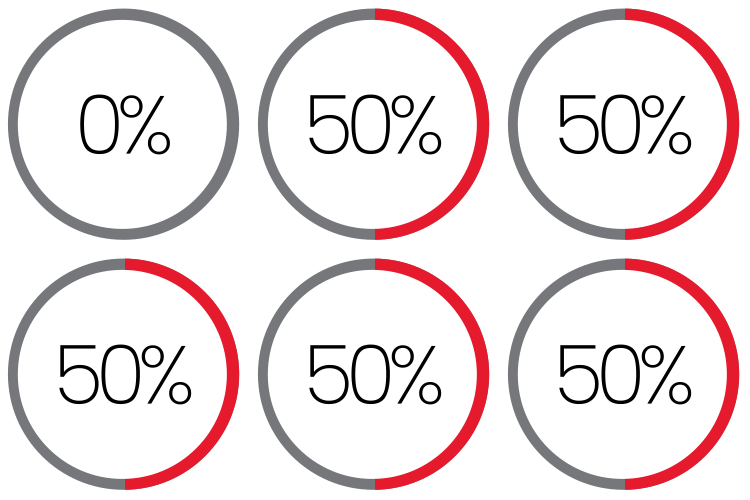
Employee resistance to new platforms
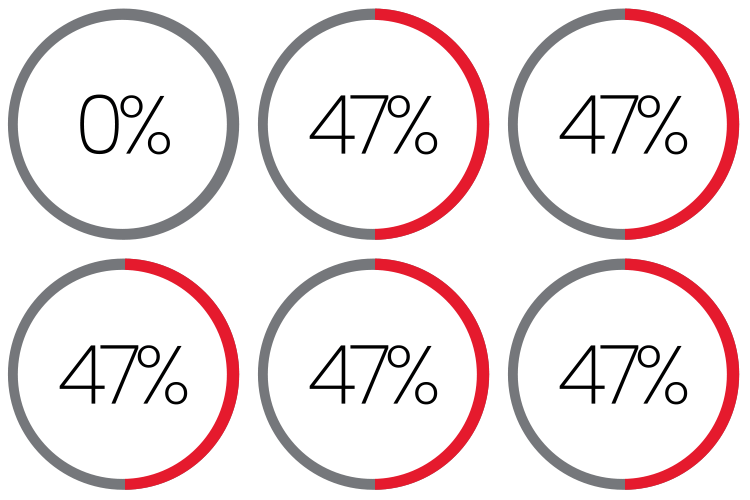
Lack of integration among tools
“When COVID started, and organizations had to make the decision to send all of their people home, they bought the tools they needed in the moment that they could get access to,” says Sheena Vojta, director of digital experience at CDW. “But it's really difficult to be intentional about your investment decisions if those decisions are being made in individualized silos rather than as part of an organization's overall IT roadmap.”
Satisfaction With Workplace Tools
While the echoes of the pandemic continue at some organizations, many respondents indicated that they are happy with the quality of the technology tools they have to help users work together. In fact, 88% said they were satisfied or very satisfied with the overall user experience of their meeting platform. The same percentage indicated that they were satisfied or very satisfied with the video and audio quality.
These results suggest that organizations have achieved some level of success in their strategic planning for workplace technologies in the post-pandemic era, Vojta says. This planning requires a clear roadmap leading to desired outcomes. The cloud has provided an effective path to solve the integration problems that many organizations face. “With everything going toward the cloud, we're seeing that it is a lot easier to start integrating these things,” Snyder Turner says.
AI Workplace Tools Are Revolutionizing the Employee Experience
The research revealed a broad sense of optimism among respondents about the impact that AI can have in the workplace. The top trend in end-user technology that respondents said they were most curious and excited about was AI-enhanced collaboration (for handling tasks such as meeting summaries, process automation and scheduling). Roughly 80% of respondents said they were excited about this trend.
“There's a lot of fear about AI displacing workers,” Snyder Turner says. “But I have less fear about it and more optimism that AI will take over tasks that lead to low job satisfaction and will deliver higher job satisfaction and enable folks to work on more complex things.”
WHICH TREND IN END-USER TECHNOLOGY ARE YOU MOST CURIOUS OR EXCITED ABOUT?
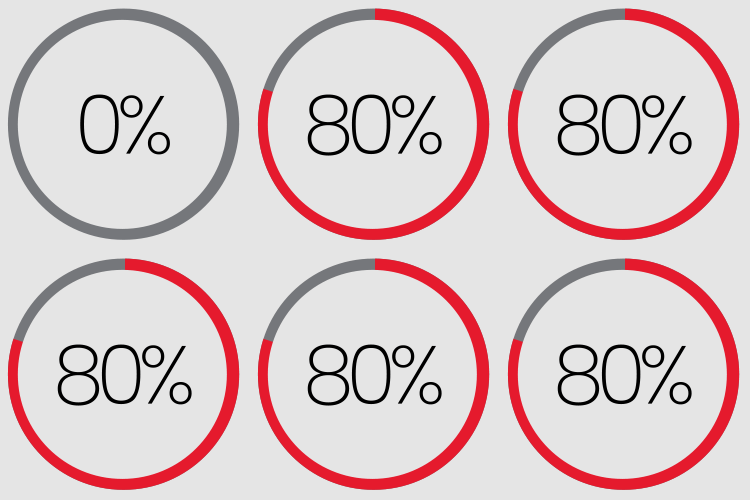
AI-enhanced collaboration (meeting summaries, proces automation, scheduling)
How AI Improves Workplace Productivity and Automation
Respondents seemed to share a similar vision for AI. When we asked, “What’s one limitation with your current end-user technology environment that you hope AI can solve?” the most common responses cited automation and workflow efficiency. “AI could streamline fragmented workflows across platforms, reducing context-switching and improving focus, productivity and support for diverse user needs,” one respondent wrote.
Another stated: “One limitation with our current end-user technology environment is manual, repetitive tasks. I hope AI can automate these processes to improve efficiency and reduce human error.”

Achieving AI’s Potential Requires Preparation
Among organizations exploring AI tools, most hoped these tools would help boost employee productivity (68%) and improve security and compliance (68%). To achieve these objectives, many organizations are deploying tools that can be integrated easily within their digital workspaces.
IF YOUR ORGANIZATION IS EXPLORING AI TOOLS, WHAT DO YOU HOPE THESE TOOLS WILL HELP WITH?
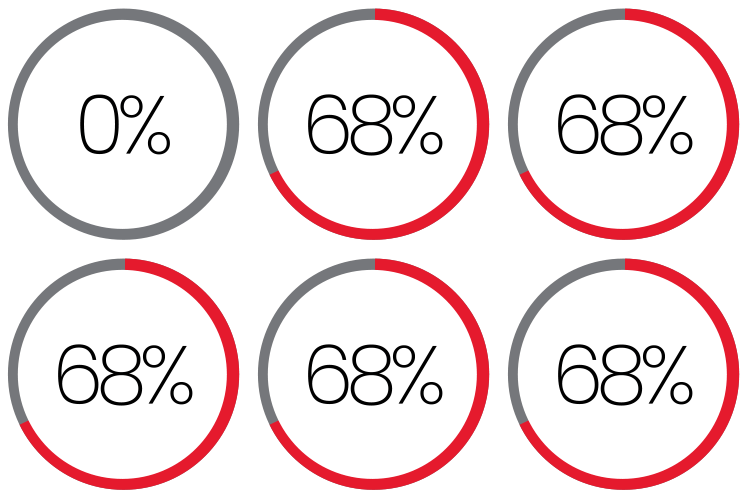
Improving security and compliance
“The first step in AI for many organizations has been to give individual coworkers tools that can help them do their jobs better, such as Microsoft Copilot, and help them be more efficient,” Vojta says.
Follow the Steps to AI Success
When preparing for new AI use cases, most respondents said their organizations have taken the following steps: introduced ethical-use policies for AI and data (58%), cleaned up or removed outdated or stale data (57%) and assessed data readiness or implemented access reviews (57%). These steps are best practices that organizations across industries should follow as they explore AI’s capabilities.
“That is 100% what we're recommending organizations do, and by and large that is what they are doing,” Vojta says. “It's really easy to get excited about the possibilities that AI brings to organizations, but it is so important to be intentional about how AI is being utilized.”
CDW can help you implement AI in your workplace.
The Ever-Present Specter of Security
As workplaces have become increasingly digital, incorporating more tools and technologies, security has become a top priority — and a major challenge. When we asked respondents about their biggest pain points with regard to securing remote or hybrid work, 70% cited managing diverse device and network environments.
“Security is always a concern, and it’s going to be a concern every day of our lives,” Snyder Turner says. “Hackers are always getting smarter. They’re always finding new ways to attack and to build on what somebody else did before them, and then they get to the next level. So, we're constantly having to add new defenses.”
WHAT IS YOUR BIGGEST PAIN POINT WHEN SECURING REMOTE OR HYBRID WORK ENVIRONMENTS?
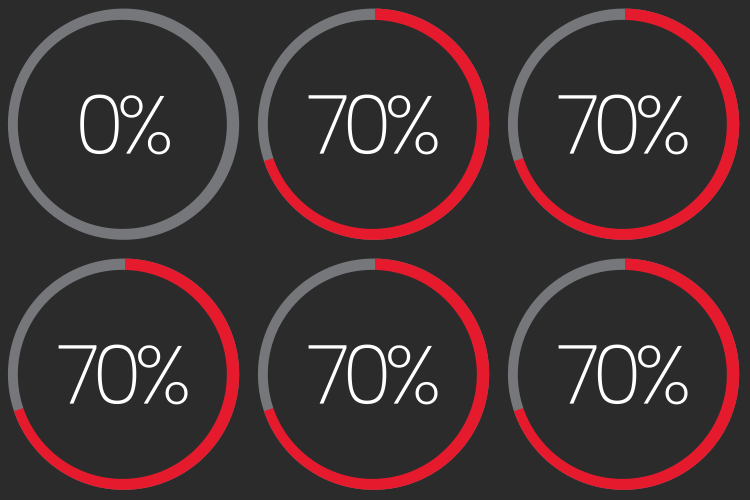
Managing diverse device and network environments
A Critical Consideration
Security factors are paramount when IT leaders consider technologies to build their digital workspaces. When we asked, “How important are security and data privacy when choosing or switching digital workspace tools?” the vast majority of respondents (64%) said “extremely important,” while 30% said “important.”
“When we’re looking at a set of tools or a platform, particularly if we’re migrating from one tool to another, we have to look at the embedded security of that tool and how it aligns to the security investments that we might already have,” Vojta says. “This helps create the most secure solution that protects the organization and still offers a seamless employee experience.”
Applying Security in the Digital Workplace
Addressing cybersecurity challenges effectively requires the strategic application of policies and technologies. A significant majority of respondents (68%) believe AI has the power to help them improve security and compliance.
Mehboob Ahmad, a principal field solution architect for digital experience at CDW, says that AI can help analysts in a security operations center sift through terabytes of data from security logs to identify threats and vulnerabilities. “Being able to ask an AI tool a question in human terms — rather than having to know a structured query language — is a big win, where you can quickly enable your analysts to interact with those vast data lakes without having to rescale them,” Ahmad says. “Another example is the ability to find conflicts in a conditional access policy. It would take a lot of time for a human to pore through those policies to figure out where the conflicts may be, but an AI agent can do that analysis at machine speed and give you actionable findings quickly.”
WHAT IS YOUR ORGANIZATION DOING TO STRIKE A BALANCE BETWEEN USER EXPERIENCE AND SECURITY?
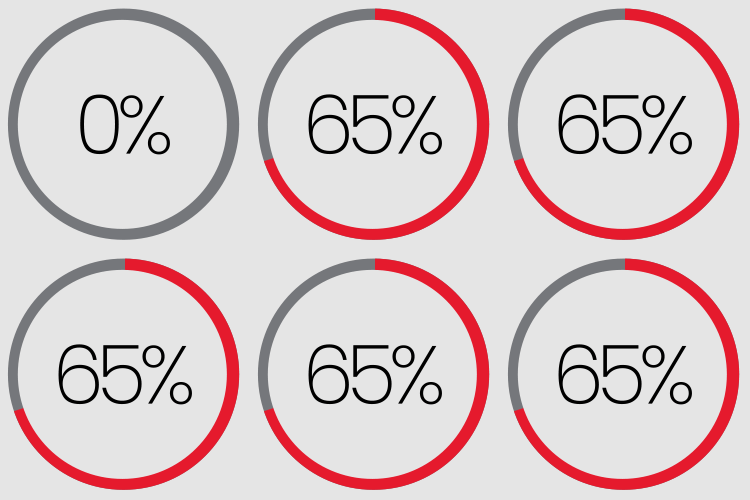
Enabling multifactor authentication
Making Authentication Work
Authenticating users remains an essential capability for securing digital workspaces. In fact, 65% of respondents said their organization is using multifactor authentication to strike a balance between user experience and security. Further, 36% of the ITDMs we surveyed said they were implementing passwordless authentication or had fully implemented it, while another 36% were planning for the technology or testing it.
“It’s important to remember that passwordless is a journey; you’re not going to get there overnight,” Ahmad says. “We generally start with stronger authentication, such as device-based, and then layer biometric authentication, such as face recognition or thumbprints, on top of it. It will likely be a combination of such factors that will help you along your journey toward securing end-user identities.”
CDW can help your workforce remain secure and productive from anywhere.

The Continuing Evolution of the Contact Center
Our research indicated that organizations are adopting a multichannel approach in their contact centers, as more than 50% of respondents said they support voice, chat, text, email and social media.
As organizations continue to evolve their contact centers, Snyder Turner suggests they should make sure to keep their customers in mind. “Designing things for the ease of customers is where we need to go,” she says. “This research clearly reminds IT folks of the importance of what the customers want.”
Organizations are using AI to improve their contact center operations in a variety of ways. The most prominent use cases were chatbots and virtual agents (66%) and intelligent interactive voice response tools (60%).
HOW IS YOUR ORGANIZATION USING AI TO IMPROVE CUSTOMER SERVICE?
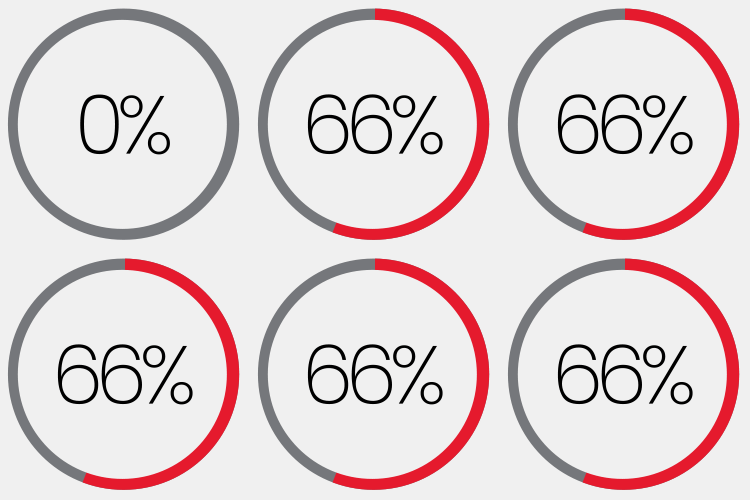
Chatbots and virtual clients
Automating Contact Center Success
One significant benefit of such automated tools is that they can collect data that helps contact centers improve the experience of customers who call them. “As the contact center manager, I now have hard data on what people are calling in for and what they actually want to talk about,” Snyder Turner says. “And if there's an issue in there, I can see where it happens, and I can improve my system so that I'm having fewer customer issues.”
However, to use these tools effectively, data governance is critical. Sam Mashburn, technical lead for the Microsoft Productivity Practice at CDW, recommends that contact centers and other digital workspaces take advantage of tools such as Microsoft Purview to govern their data across on-premises, multicloud and Software as a Service environments.
“A lot of organizations aren’t ready for AI because they don’t have their data managed effectively,” Mashburn says. “Content sprawl is a real problem. How do we make that data into a manageable form so that AI can use it?”
Tom Dietz, a Microsoft technical lead at CDW, recommends focusing AI tools on specific sets of data, such as an HR handbook. This helps keep AI on the right track and reduces the number of errors it may return. “We're finding that when you can point or configure your virtual agent to a specific set of data, it is fairly effective in finding the data it needs,” he says. “It's much more accurate, so that's a big win.”
CDW can help your organization achieve contact center success.
Implementing Collaboration Tools
Respondents revealed a largely positive opinion of the collaboration tools their organizations have implemented. When asked to rate how well their organization had adopted their current collaboration tools, over half (53%) answered “very well.” The features they valued most were clear, consistent communication (72%), faster or more efficient workflows (69%) and easy access for all users (66%).
“The biggest thing we get from collaboration tools is real-time communication with other employees. That can be audio or chat, but they need the ability to have a workspace spun up instantly,” Dietz says. “If you take it a step further, you can start sharing files, and you can automate processes. You have that integration inside the collaboration platform.”
Nearly half of respondents (45%) said their organization uses two meeting platforms. The most widely used platforms, among all respondents, are Zoom (34%) and Microsoft Teams (33%).

Minding the Gaps in Collaboration
Organizations still face challenges when using collaboration tools to establish digital workspaces that deliver equitable experiences for both remote and in-person coworkers. When asked about the challenges they face in creating equitable employee experiences across both digital tools and physical workspaces, 60% said they face communication gaps across locations, while 52% cited lack of equal visibility in meetings and another 52% cited difficulty accessing shared resources.
Respondents most commonly pointed to training (64%) as the step they were taking to address these challenges. “There's always a learning curve with new technology, but users often get frustrated because they just want to get their job done,” Dietz says. “This is where adoption and advisory services can help.”
Building Out the Modern Workplace
Ultimately, work — and the workspaces that organizations provide — will continue to evolve. Organizations will still need tools to support coworkers in multiple environments (onsite, remote and hybrid). When we asked, “If you could consolidate your calling, meeting and messaging tools into a single platform, what would matter most?” 66% said “a smoother user experience,” while 61% said “tighter security.”
“Change is hard. Change with immediate value and intentional planning behind it will always be better received and adopted,” Vojta says. “Without planning, adoption and intention, change can feel like a blocker instead of an enhancer to the employee experience.”
IF YOU COULD CONSOLIDATE YOUR CALLING, MEETING AND MESSAGING TOOLS INTO A SINGLE PLATFORM, WHAT WOULD MATTER MOST?
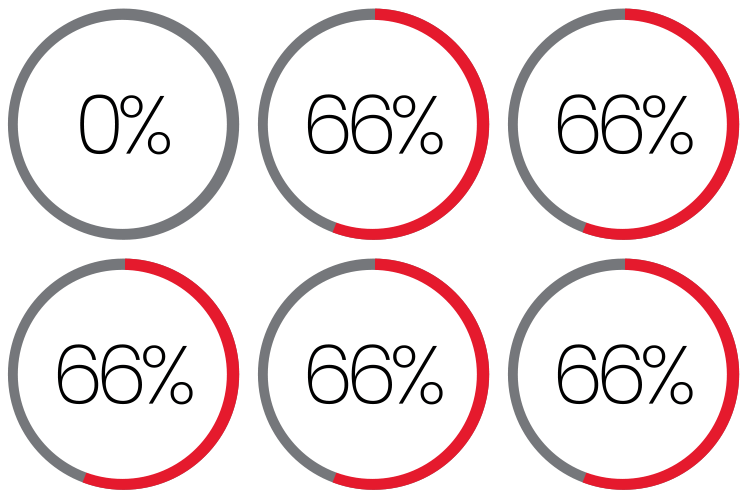
A smoother user experience
Increased Attention to Sustainability
Our research indicates that as organizations engage in planning their workspaces, they are considering sustainability when they make their purchasing decisions. When asked how strongly their organization prioritizes sustainable tech choices and responsible IT asset disposal, 50% said “very strongly” and 39% said “strongly.”
“We’re seeing this in buying decisions; organizations are more likely to buy tools or hardware from vendors that use sustainable practices,” Vojta says. “We're also seeing interest in Device as a Service solutions that include IT asset disposal and the reuse of devices.”
As the modern workplace evolves, organizations will continue to focus on the most important element: their people. They need tools that create an environment in which they can optimize efficiency and productivity while also delivering the experience users want. “It’s easy for organizations to want to solve for a specific need, but when folks look across their entire organization and set of tools, there are opportunities to improve employee experience by leaning into business outcomes, with the employee at the center of the effort,” Vojta says. “When organizations embrace this mindset, we find that they see improved productivity and loyalty in their most important asset, their people.”