Skip to Main Content
Notifications
Notifications
CDW Logo

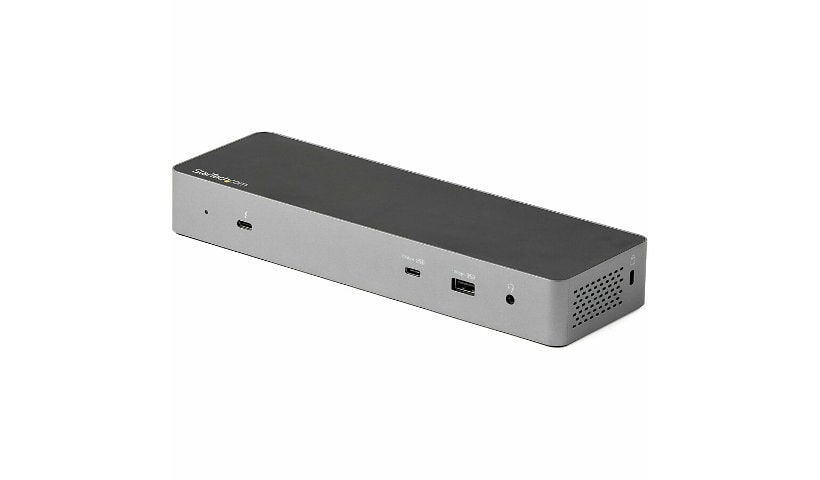
StarTech.com Thunderbolt 3 Docking Station, Dual Monitor USB-C Dock, 4K DisplayPort, 85W PD - Replaced by TB3CDK2DH

Mfg # TB3DK2DPPD CDW # 4719897 | UNSPSC 43211602

Quick tech specs

  • REPLACED BY TB3CDK2DH
  • Works w/ all TB 3/4 laptops; Extended Dual Display on Apple M1/M2/M3/M4 Max/Pro MacBooks; Single Display on base M-series MacBooks and iPad Pro M1 & later
  • 6ft USB-C to DP and TB3 host cables incl
  • Certified Thunderbolt 3 docking station; Driverless setup; Dual monitor 4K 60Hz w/DisplayPort + TB3 (USB-C) video or single 5K
  • Downstream TB3 port for 2nd display/daisy chain; 85W PD; 6x USB; SD; GbE; Headset Port
  • Connectivity Tools w/MAC address Pass-Through & more
View All View More

Know your gear

Easily transform your Thunderbolt 3™ equipped MacBook Pro or Windows laptop into a dual-4K workstation with up to 40Gbps of throughput. The high-quality TB3 dock features three USB 3.0 ports, 85W Power Delivery to charge your laptop.

Create a Dual-4K Workstation

Great for video editing and other Ultra HD tasks, this dual-4K monitor docking station supports 40Gbps speeds and 4K resolution on two monitors. Run resource-demanding applications on two independent displays, without draining system resources.

Connect your laptop to:

  • 1 x 4K monitor via the DP Port
  • 1 x 4K monitor via the TB3 USB-C Port (1.8 m cable included)

OR

  • 1 x 5K monitor via the DP & TB3 USB-C port

Easy Installation & Deployment

Simply connect the TB3 dock to your laptop with included TB3 cable and start working immediately. No time-consuming driver installations are required.

Connect your Devices

With three USB 3.0 ports, the Thunderbolt 3 docking station gives you plenty of ports for the latest and legacy devices. Connect USB devices like flash drives using the two Type-A ports. Keep your mobile device charged with the dock's Fast-Charge and sync port. Connect a USB-C device with the USB-C port ( 5Gbps - data only ).

Plenty of Charging Power

The Thunderbolt 3 docking station features a 170W power adapter supporting Power Delivery to power and charge (up to 85W) your laptop, while powering all your devices connected to the dock. This eliminates the need to use two separate power adapters for your laptop and dock.

Enhance Productivity and Device Management with the StarTech.com Connectivity Tools Application

Developed to improve performance and security, StarTech.com Connectivity Tools is the only software suite on the market that works with a wide range of IT connectivity accessories. The software suite includes:

  • Advanced Windows Layout Utility: To setup and save custom windows layouts.

  • Mac Address Pass-Through Utility: To improve network security.

  • USB Event Monitoring Utility: To track and log connected USB devices

  • Wi-Fi Auto Switch Utility: Enabling users to quickly access faster network speeds via wired LAN.

For more information and to download the StarTech.com Connectivity Tools application, please visit: www.StarTech.com/Connectivity-Tools


TB3DK2DPPD features a rugged aluminum casing and is backed by a StarTech.com 3-year warranty and free lifetime technical support.

This item was discontinued on December 09, 2025

Enhance your purchase

StarTech.com Thunderbolt 3 Dock - Dual 4k - MacBook Pro & Windows - 85W PD is rated 3.00 out of 5 by 6.
Rated 5 out of 5 by from Squealing noise The dock makes a constant squealing noise. Its's extremely irritating, looking at other reviews it seems to be an issue with the power supply. Also the included thunderbolt 3 cable is only a foot long.
Date published: 2020-08-13T00:00:00-04:00
Rated 5 out of 5 by from A sleek, beautiful and powerful HP Dock. I use this HP Thunderbolt 3 Dock with Dual Monitor 4K DisplayPort for my EliteBook 850 G7. This is a sleek, beautiful and powerful dock. Its support for USB Type-C and its performance was consistent and smooth, even at 4K.
Date published: 2021-06-03T19:35:22-04:00
Rated 5 out of 5 by from Does NOT support dual monitors Beware: This dock does NOT support dual monitors. I have a 2019 15" MacBook Pro running macOS 10.14.6 Mojave and two HP ZR2740w monitors (native resolution 2560 x 1440 @ 60 Hz). When I plug one monitor into the dock and one into the computer, they both work. But when I plug both into the dock, they do not work. The mouse freezes every few seconds, and I can not use the computer. Unacceptable.
Date published: 2019-08-08T00:00:00-04:00
Rated 5 out of 5 by from AMAZING DOCK Love this dock. It works very well with in Windows and macOS. Dual monitors works flawlessly. Great speeds with ethernet port. It just works!
Date published: 2020-03-31T00:00:00-04:00
Rated 5 out of 5 by from Dell Latitude 5400 connection Connected to thunderbolt port my company issued Dell Laptop (Latitude 5400) without issue. I am running 2 1080P 27" monitors. Simple to set up. All ports work.
Date published: 2020-07-15T16:26:05-04:00
Rated 5 out of 5 by from When it works, its fine. But rarely works. I've used this docking station for almost two years now. When it does work, its fine. But I get a plethora of graphical issues if I ever disconnect and reconnect my laptop (even though its the main function of the device). It has issues constantly not recognizing monitors, giving me black screens. pixel jarring, I've had to work entire days with a single monitor because nothing I tried got it to recognize the second one (restarting, switching out cables, updating drivers, using a different workstation, NOTHING works). The PC constantly gives me popups that the "USB device not recognized" even thought it was recognized 10 minutes before. Honestly, I'd avoid this docking station if I were you.
Date published: 2022-10-04T00:00:00-04:00