

Brother HL-L9310CDW - Business Color Laser Printer
Mfg # HLL9310CDW
CDW # 4540207
| UNSPSC 43212105
Quick tech specs
- for Mid-Size Workgroups with Higher Print Volumes
- Automatic Duplex Print
- Wireless LAN
- 33 ppm Mono / 33 ppm Color
- Ethernet
- USB

Know your gear
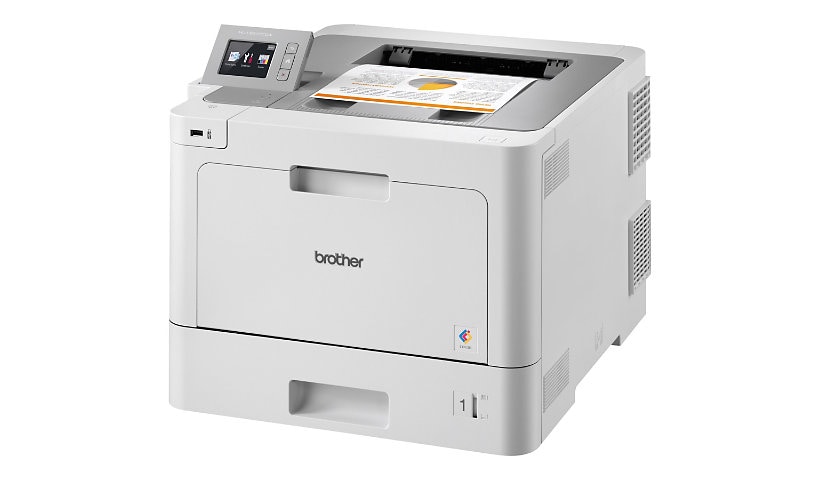
Excellent choice for mid-sized workgroups with demanding print volumes, this high-performance color printer helps increase your productivity with print speeds up to 33 pages per minute and 2.7" touch screen for easy navigation and direct printing from popular business cloud services. Advanced security features include an integrated NFC card reader and Active Directory support for network user authentication. Advanced features help protect against unauthorized device access and help control costs by restricting printing on a per user or group basis. Built-in wireless 802.11b/g/n and Gigabit Ethernet network interfaces allow easy setup and sharing on your wireless or wired network. The 250-sheet input tray is adjustable for letter-size or legal-size paper. The 50-sheet capacity multipurpose tray holds letterhead and alternative media. Color laser printer also features 1GB memory, 800 MHz processor, automatic two-sided printing and more.
Enhance your purchase
Brother HL-L9310CDW - printer - color - laser is rated
2.70 out of
5 by
10.
Rated 5 out of
5 by
Jim from
Can't set up
Can't connect to the computer. Returned it.
Date published: 2020-09-23T00:00:00-04:00
Rated 5 out of
5 by
big user from
not good for printing
I have two bought extra feeder trays so room for 1000 sheets, and you need to sit in front of it to remove paper all the time, room for 150 sheets, but keeps printing and pushes it onto the floor so a wast of time buying the extra feeder So remember only 150 sheet of paper in the paper draw unless you sit next to it
Date published: 2020-05-09T00:00:00-04:00
Rated 5 out of
5 by
George from
Worth the money
Nice looking, easy to work on. Wifi, boots up fast
Date published: 2022-11-15T00:00:00-05:00
Rated 5 out of
5 by
Business user 1224 from
Better than HP
Glad I made the switch. Great quality. Easy to setup. Well done brother !
Date published: 2020-10-02T00:00:00-04:00
Rated 5 out of
5 by
bob27 from
Arrived with problems, brand new
For the price, you would think it would work out of the box. I installed the drivers, set it up, and found streaks on test pages. Found a guide online (not in the help pdf of this specific printer to try to find debris on the drum. I followed the instructions and saw a small hair on this 'brand new' printer! By the way, the toner comes pre-installed in the printer. I cleaned the toner and it still has dots and streaks on each page at the same exact locations.
Date published: 2021-01-20T00:00:00-05:00
Rated 5 out of
5 by
OfficeMgrCB from
Good quality print
Clean, quick printing, great color. Easy to set up.
Date published: 2021-02-17T00:00:00-05:00
Rated 5 out of
5 by
The Printer Guy from
Must be clean!
Printers work well in most cases. I have one client that purchased 4 of these. 3 of the 4 have failed several times. I'm told dust is the issue. The customer used all Oki Data printers before Brother with no issues. He has now switched to Canon. Time will tell if he has issues with Canon.
Date published: 2022-04-28T00:00:00-04:00
Rated 5 out of
5 by
Nothappy from
Horrible
My Brother's printer worked ok until it was time to replace the toner. I keep getting a replace the toner message on the printer. I contacted Brother's and spent the better part of a week hours each day with techs trying to fix the problem. After a week of no success I am about ready to throw out the printer and buy another brand
Date published: 2021-07-18T00:00:00-04:00
Rated 5 out of
5 by
BigB from
Nice printer for small office
This printer is great if you don't print much.
I have a 10K print per month need and it can't cut it. After 9 months the needed parts to replace (normal consumable) cost more than the printer does to replace.
Date published: 2018-09-05T00:00:00-05:00
Rated 5 out of
5 by
firetiger from
Excellent printer!
This is an excellent color printer, fast and great quality!
I've printed lots of regular paper, labels (paper and vinyl), acetate, and even 100 lb cardstock (which is way more than the machine is rated for).
One thing to note is that (like all printers) you need to give it great paper to get great results. Hammermill Premium Color Copy 28 lb is a standard paper used to evaluate the performance of printers, and with this paper the Brother is as good as any other printer I've tried.
Also for cardstock (at your own risk): use the multipurpose tray for input, open the back of the printer for output, and choose "heavyweight paper" in the settings (this increases the fuser temperature). I've had great results with Hammermill Premium Color Copy Cover, both 60 lb and 100 lb.
Date published: 2025-10-12T00:00:00-04:00